

Claude Pro is Anthropic's paid tier that gives you higher usage limits, access to Claude's most capable models, and priority access during peak times. If you no longer need it, canceling takes about a minute and doesn't require calling anyone or emailing support.
This guide walks you through the exact steps, what happens to your access after you cancel, and how refunds work.
Before You Start
A few things worth knowing before you cancel:
- You need to cancel from the same account that pays for the subscription. If someone else set up billing, they'll need to do it.
- Canceling stops future charges but doesn't immediately end access. You keep Pro features until your current billing cycle ends.
- If you subscribed through the iOS App Store or Google Play, you have to cancel through Apple or Google, not through Claude's website.
Cancel Claude Pro on the Web
This is the standard method for anyone who signed up directly at claude.ai.
- Go to claude.ai and log in to your account.
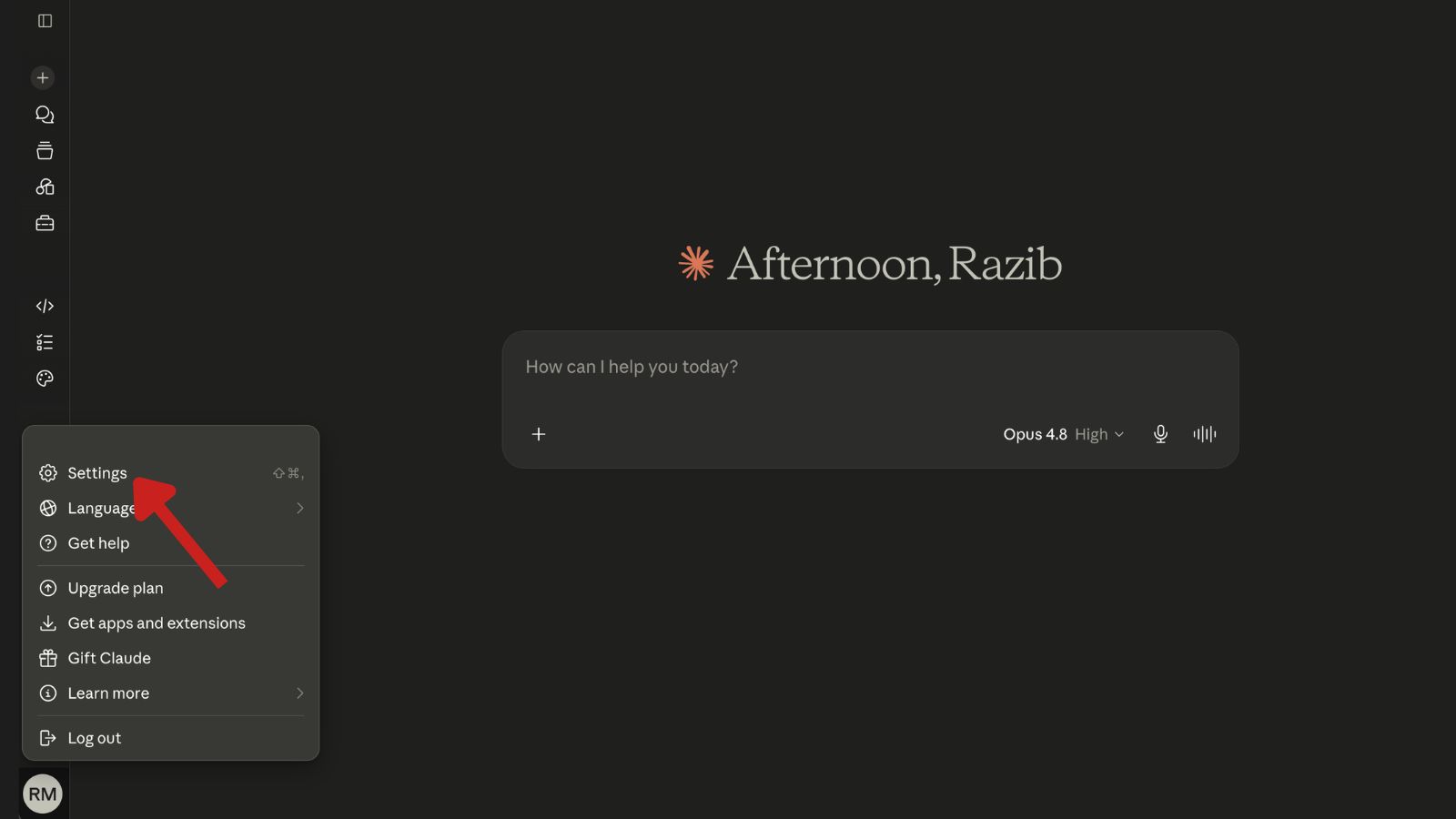
- Click your initials or profile icon in the bottom-left corner of the screen.
- Select Settings from the menu.
- Click the Billing tab.
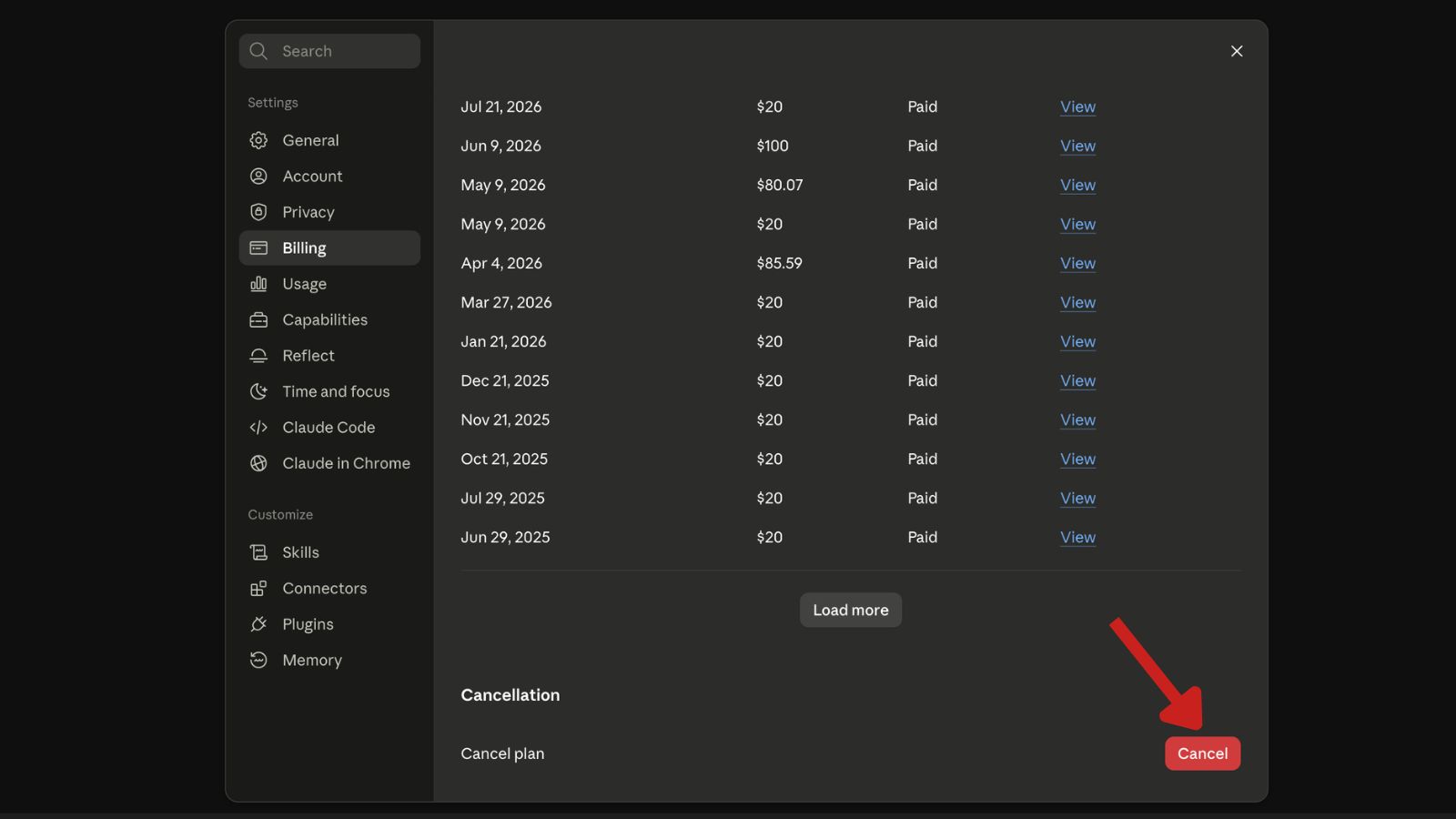
- Click Cancel plan and confirm your choice.
You'll see a confirmation message showing the date your Pro access will end. Anthropic also sends a confirmation email. If you don't get one within a few minutes, check your spam folder or refresh the billing page to confirm the status changed to "canceled."
Track your trial deadline and cancel before you get charged.
Cancel Claude Pro on iOS (App Store)
If you subscribed through the Claude iPhone or iPad app, Apple handles the billing.
- Open Settings on your iPhone or iPad.
- Tap your name at the top.
- Tap Subscriptions.
- Find Claude in the list and tap it.
- Tap Cancel Subscription and confirm.
Cancel Claude Pro on Android (Google Play)
Same idea if you subscribed through the Google Play Store.
- Open the Google Play Store app.
- Tap your profile icon in the top right.
- Tap Payments & subscriptions > Subscriptions.
- Select Claude.
- Tap Cancel subscription and follow the prompts.
What Happens After You Cancel
Your subscription stays active until the end of the period you already paid for. After that, your account downgrades to the free plan automatically. You keep your chat history, projects, and settings. You'll just be subject to the free plan's lower usage limits and won't have access to premium models at higher quotas.
You can resubscribe at any time by going back to Settings > Billing and choosing a plan.
Refund Policy
Anthropic's standard policy is that subscription payments are non-refundable. That said, they do consider refund requests case by case, especially if you were charged unexpectedly or ran into a technical issue you couldn't use the service for.
If you were billed within the last 24 hours and haven't used Pro features that cycle, contact support quickly. Refund success is much higher when you reach out immediately.
To request a refund, email support@anthropic.com or open a ticket through the Claude Help Center. Include your account email, the charge date, and a short reason.
| Plan | Billing Cycle | Cancel Anytime | Refund Default |
|---|---|---|---|
| Pro (monthly) | Monthly | Yes | Non-refundable |
| Pro (annual) | Yearly | Yes | Non-refundable |
| Max | Monthly | Yes | Non-refundable |
Common Problems
You don't see a "Manage subscription" button. This usually means you're logged into the wrong account or your subscription was purchased through Apple or Google. Check your original signup email to confirm which account was billed.
The Stripe portal shows no active subscription. Your plan may already be canceled, or the payment failed. Check the Billing page for status and look for any past-due notice.
You were charged after canceling. Confirm the charge date matches your renewal date rather than a new payment. If it's a genuine post-cancellation charge, email support with a screenshot of your cancellation confirmation.
Team or Enterprise plan. These have separate cancellation terms. The workspace primary owner needs to cancel from the team settings page, and terms may follow the original agreement rather than the self-serve flow above.



