Gemini Pro (now branded as Google AI Pro, formerly Google One AI Premium) is billed monthly or yearly through your Google account. Cancelling only takes a couple of minutes if you know where to look, and you keep access to Pro features until your paid period ends.
Before You Start
Make sure you're signed in to the same Google account that owns the subscription. If you subscribed through the Apple App Store or Google Play, you'll need to cancel in that store instead of on the Gemini website.
Have your billing email handy in case Google asks you to reconfirm. If someone else in your family manages the account, they'll need to do the cancellation.
Cancel Gemini Pro on the Web
This is the fastest method for most people.
- Go to gemini.google.com and sign in.
- Click the Settings icon in the bottom-left to open the menu.
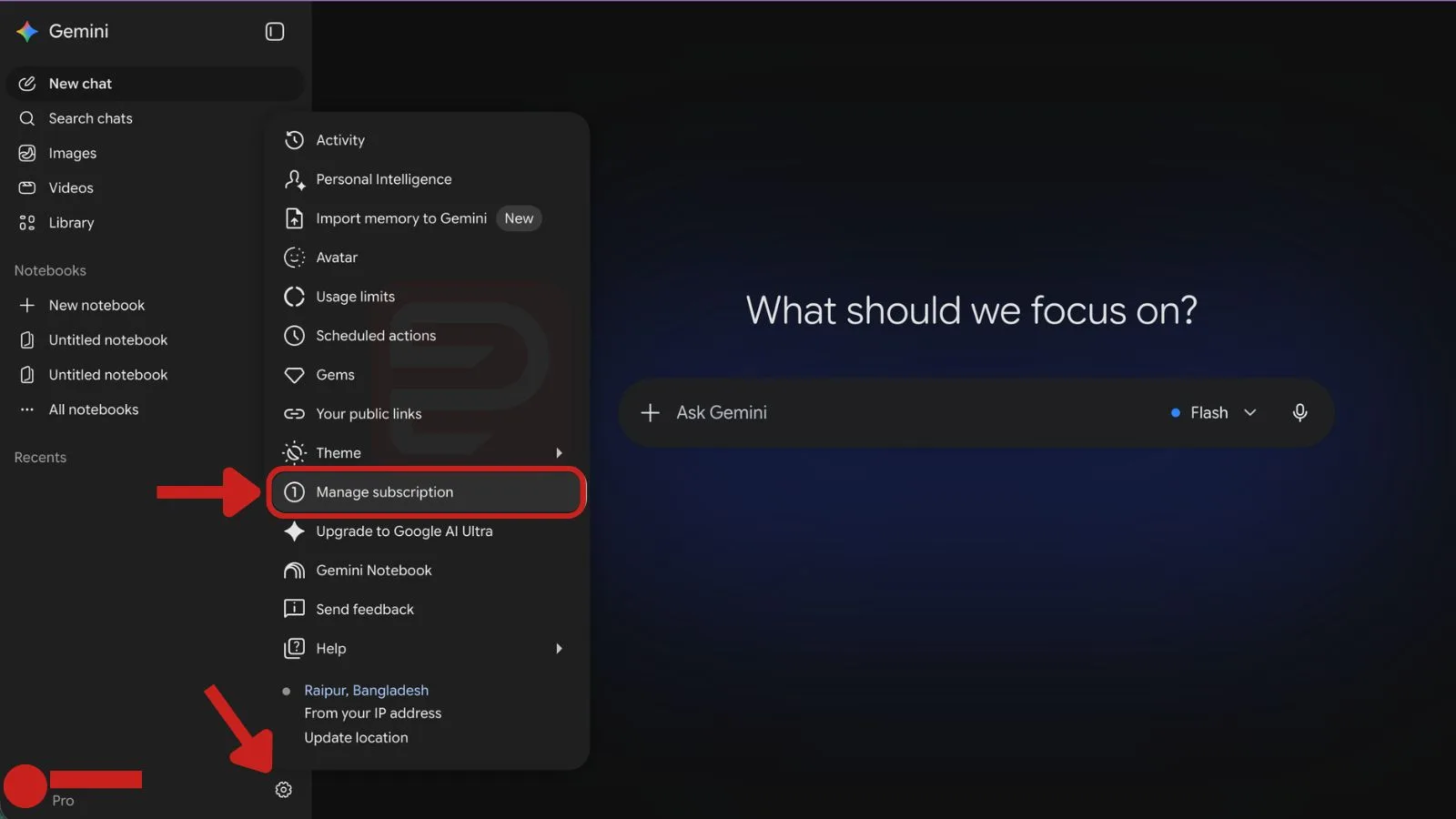
- Choose Manage subscription menu. (Note: this opens your Google One membership page)
- Choose Manage membership in the left sidebar.
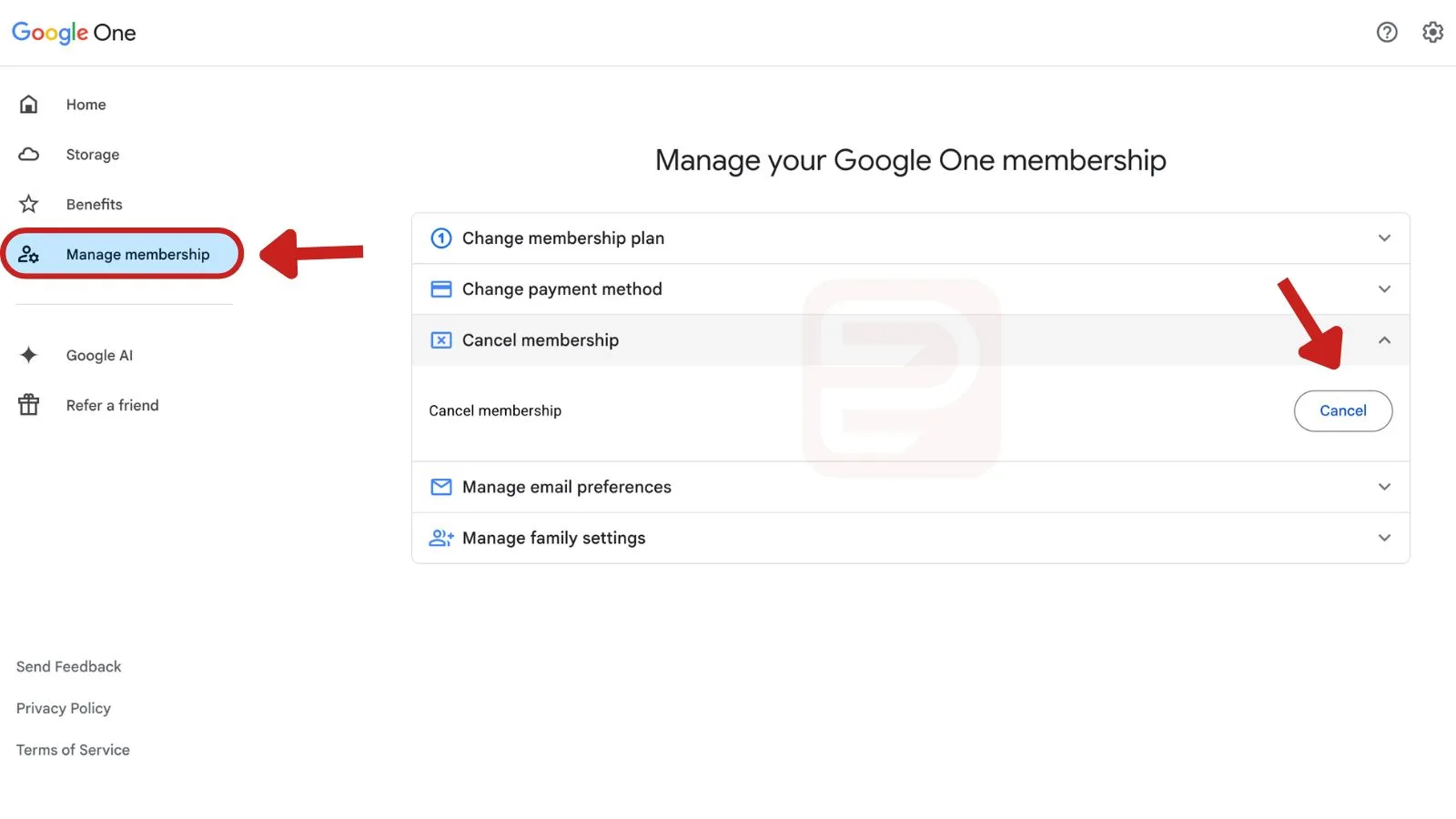
- Click Cancel membership, then click Cancel button to confirm.
Keep the confirmation email. It's the cleanest proof you cancelled if Google bills you again by mistake.
Cancel Through Google One
If you originally subscribed to the AI Premium bundle with expanded Google One storage, you'll manage it inside Google One.
- Go to one.google.com.
- Click Manage membership in the left sidebar.
- Click Cancel membership, then click Cancel button to confirm.
Your storage tier drops back to the free 15 GB after the paid period ends, so move or download any files that push you over that limit.
Cancel on iPhone or iPad
If you subscribed via the Gemini iOS app or through Apple, cancel in your Apple account.
- Open Settings on your iPhone.
- Tap your name at the top, then tap Subscriptions.
- Find Gemini or Google One in the list.
- Tap Cancel Subscription and confirm.
Cancel on Android
If your subscription is billed through Google Play:
- Open the Google Play Store app.
- Tap your profile icon and choose Payments & subscriptions, then Subscriptions.
- Tap Gemini Advanced or Google One.
- Tap Cancel subscription and follow the prompts.
Track your trial deadline and cancel before you get charged.
What Happens After You Cancel
You keep Gemini Pro access, the 2 TB of storage, and access to advanced models until your current billing cycle ends. After that, your account reverts to the free Gemini experience.
Your chat history, Gems, and saved info stay on your account. You can resubscribe later without losing them.
Refund Rules
Google doesn't offer prorated refunds for monthly plans. Annual plans may be eligible for a partial refund if you cancel early, but this is handled case by case through support.
| Situation | Refund Likely? |
|---|---|
| Cancelled monthly plan mid-cycle | No, but access continues to period end |
| Cancelled annual plan within 30 days | Possible, contact support |
| Charged after cancellation | Yes, request refund via help center |
| Free trial cancelled before end date | No charge |
To request a refund, visit Google's payments help page and start a chat or email with support.
Common Problems
You don't see "Manage subscription" in the menu. You're probably signed into a different Google account than the one being billed. Sign out and back in with the account that receives the receipts.
The Cancel button is greyed out. This usually means your subscription is being managed by a family organizer or through Apple/Google Play. Cancel in that place instead.
You were charged after cancelling. Check the receipt date against your cancellation confirmation email. If the charge came after, open a support case through the Gemini Help Center and attach the confirmation.
You want to pause instead of cancel. Google doesn't offer a pause option for Gemini Pro. You'll need to cancel and resubscribe when you want it back.
If you're switching to a different AI tool, download any important Gems or exported chats before your access ends.