

Netflix makes cancelling relatively painless compared to most streaming services. You can do the whole thing from a browser in about a minute, and you'll keep access until your billing cycle ends. Here's how to shut it down cleanly and avoid a surprise charge next month.
Before You Start
You'll need the email and password for the account holder. If someone else in your household set up the account (a parent, roommate, or ex), you can't cancel from a sub-profile. Only the primary account owner has cancellation access.
Also check how you pay. If you subscribed through Apple, Google Play, Roku, Amazon, or a cable provider like Comcast or Sky, you have to cancel through that billing partner, not Netflix directly. We'll cover both paths below.
Cancel Netflix on the Website
The fastest way is through a desktop or mobile browser. The Netflix mobile app doesn't have a cancel button on iOS for billing reasons, so a browser is your best bet.
- Go to netflix.com and sign in with the account owner's credentials.
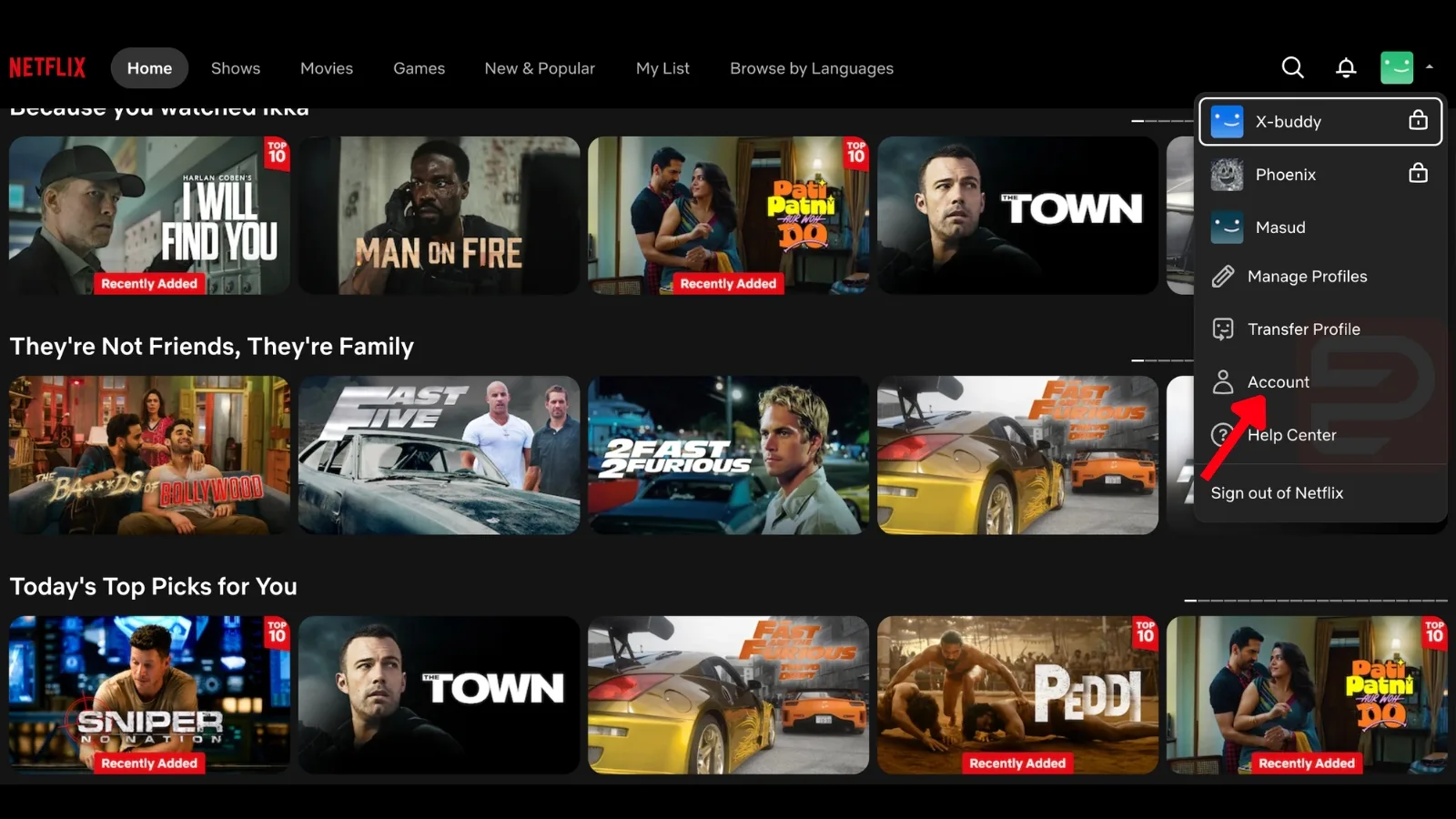
- Click your profile icon in the top right corner.
- Select Account from the dropdown menu.
- Under the Membership section, click Cancel Membership.
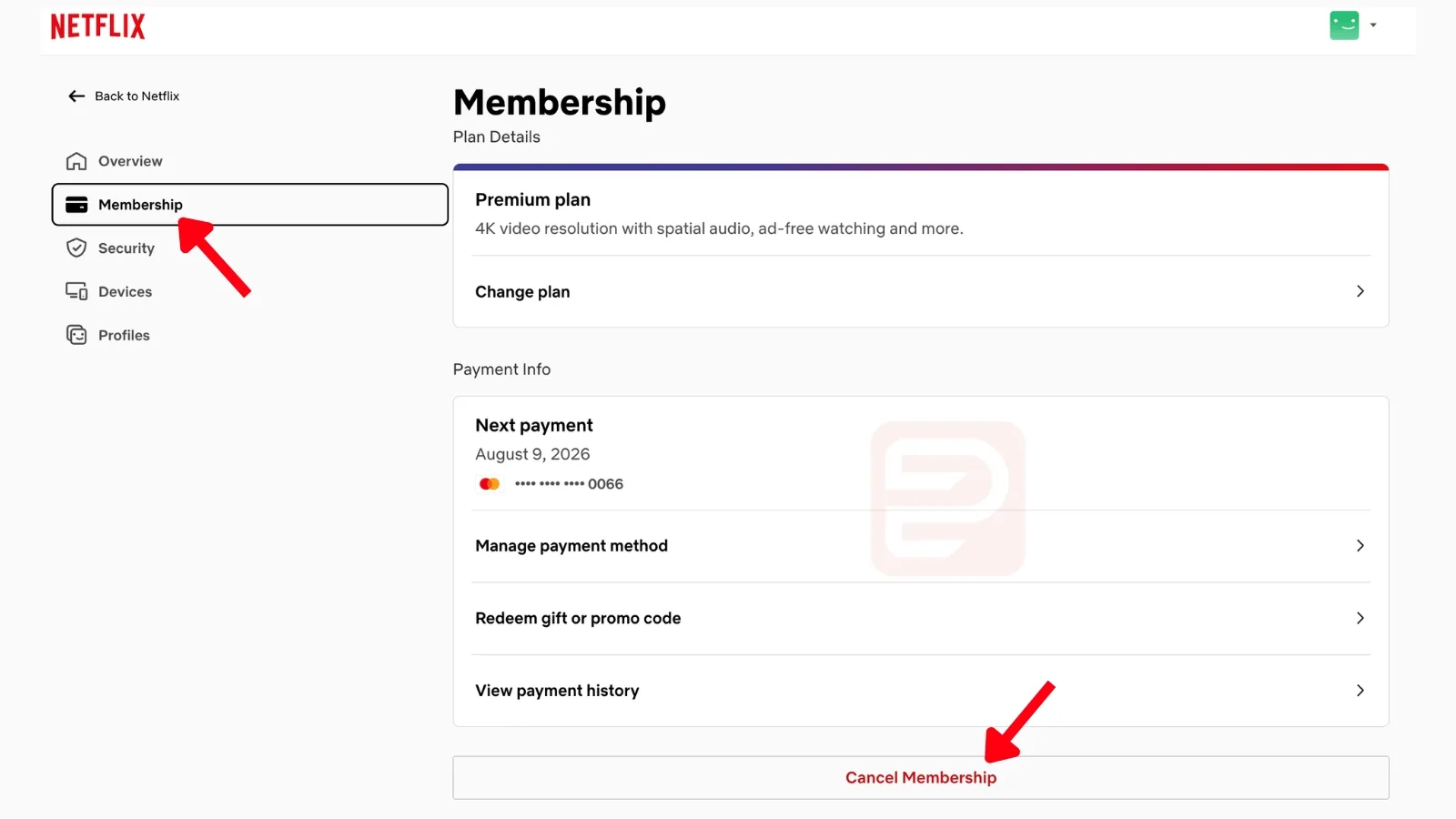
- Click Finish Cancellation on the confirmation page.
You should get a confirmation email within a few minutes. If you don't see it, check spam. Your account will show a cancellation date, and you can keep watching until then.
Cancel Netflix Through Apple (iTunes)
If you signed up through the App Store, the charge appears on your Apple bill and Netflix can't cancel it.
- Open Settings on your iPhone or iPad.
- Tap your name at the top, then tap Subscriptions.
- Find Netflix in the list and tap it.
- Tap Cancel Subscription and confirm.
Cancel Netflix Through Google Play
- Open the Google Play Store app on Android.
- Tap your profile icon, then Payments & subscriptions > Subscriptions.
- Select Netflix and tap Cancel subscription.
- Follow the prompts to confirm.
Cancel Netflix Through a Third-Party Biller
If you pay through Roku, Amazon, Comcast, Sky, T-Mobile, Verizon, or another partner, log into that account and cancel from their subscription management page. Netflix's billing help page lists steps for each partner.
Cancelling in the wrong place won't stop the charge. If you don't see a Cancel Membership button on Netflix.com, you're billed by a third party.
What Happens After You Cancel
Your account doesn't shut off immediately. You keep full access until the last day of your current billing period, so there's no reason to cancel early in the month unless you want to.
Netflix also holds onto your viewing history, list, and profile settings for 10 months after cancellation. If you resubscribe within that window, everything comes back. After 10 months, the account is deleted.
Check whether your purchase is still within the return window.
Netflix Refund Policy
Netflix generally doesn't issue partial refunds for unused time in a billing cycle. You just keep watching until the period ends. But if you were charged after cancelling, charged twice, or forgot about the account entirely, you can request a refund by contacting Netflix Customer Service via live chat or phone.
Be polite, mention that you didn't use the service, and ask for a courtesy refund. They approve these fairly often, especially for accounts that haven't streamed in months.
Cancellation Rules at a Glance
| Item | Detail |
|---|---|
| Cancellation fee | None |
| Notice required | None, cancels immediately |
| Access after cancelling | Until end of current billing period |
| Refund for unused time | Not standard, request via support |
| Data retention | 10 months, then deleted |
| Reactivation | Sign back in, no re-registration needed |
Common Problems
I don't see a Cancel Membership button. You're billed through Apple, Google, Roku, or a cable/phone provider. Cancel through them instead.
I forgot my password. Use the password reset link on the sign-in page. You'll need access to the email or phone number tied to the account.
Netflix keeps charging me after I cancelled. Sign in and check your account status. If it says Active, the cancellation didn't go through. If it says Cancelled but you're still being billed, the charge is coming from a third-party biller, not Netflix directly.
Can I pause instead of cancel? Netflix removed its pause option years ago. Your only choices are cancel, downgrade to a cheaper plan, or keep paying.
I want to switch plans instead. Go to Account > Change Plan. You can drop to the ad-supported tier to cut costs without losing your profiles or watchlist.



